
LawToolBox MCP for Microsoft 365 & Claude Connects Legal AI to Matter Data Containers in M365
LawToolBox creates AI-ready matter containers in Microsoft 365 from systems of record and connects legal data, matter deadlines, documents, workflows, and knowledge through MCP connectors, tools, skills, and agents.
DENVER, Aug. 24, 2026 /PRNewswire/ -- LawToolBox, a legal SaaS platform that lives inside each legal organization's M365 account, transforms Outlook, Word, SharePoint and M365 Teams into a legal platform. Today, LawToolBox announces its Model Context Protocol (MCP) connector is available for use in Microsoft 365, Claude, or any AI platform. This connector includes 70 tools that leverage (i) the M365 data in the LawToolBox matter containers, (ii) the applicable laws and regulations, and (iii) the legal team's strategic analysis, amplified with LLMs and saved to containers. Ambrogi, LawNext (8/21/2026). LawToolBox uses each organization's CRM, DMS, or homegrown database as the system of record to create AI-ready client matter data containers in their M365 that adhere to data governance and ethical walls.
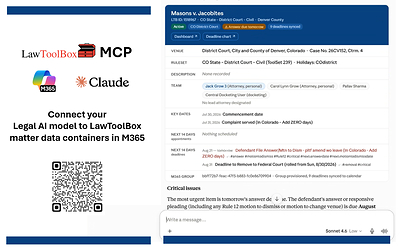
MCP Connectors - the Gateway
The LawToolBox MCP builds a gateway straight into every matter container that LawToolBox creates in M365. These containers aggregate deadlines, documents, laws, AI insights saved from M365 Copilot work, meeting transcripts, and the legal team's own strategic analysis. Every matter becomes a structured, AI-ready container that respects ethical walls and data governance. Any MCP-compatible AI such as Microsoft 365, Claude, Harvey, Legora, CoCounsel, or Lexis AI can reach that data directly, without a separate custom integration.
MCP Clients - as well as Law firms, government legal departments, and corporate legal departments - can consume the LawToolBox MCP Server directly, and integration partners can build against it instead of building their own custom connection into M365.
MCP Client |
Claude, Copilot, Harvey, Legora, ChatGPT |
MCP Server |
LawToolBox MCP, NetDocuments MCP, iManage MCP, LPM MCP, CRM MCP |
"The LawToolBox MCP, available for both Microsoft Copilot Studio and Claude, builds a gateway straight into matter containers, deadlines, documents, laws, and the legal team's strategic analysis, all tied to one specific matter in M365. That's the game changer: one governed matter container in M365, reachable by any AI a firm chooses to use." - Carol Lynn Grow, CO-CEO, LawToolBox
MCP Tools – Grounding user data. The LawToolBox MCP has 70+ tools that can be called by any MCP client. The LawToolBox tool categories consist of identity & lookups, matter data, deadlines & appointments, reports, user and firm information, SharePoint, Groups and matter data in M365, and subscription info. The LawToolBox connector:
- Summarizes data in matter container using emails, chats, deadlines, laws to share with client or outside counsel
- Extracts deadlines from contracts, real estate documents and orders in M365 or your DMS, even handwritten, and adds them to a matter calendar and Outlook
- Calculates deadlines based on laws and regulations
- Finds deadlines that end users accidentally removed from their calendar
- Syncs calculated deadlines straight to Outlook and Teams calendars
- Surfaces matter-level analytics and reports related to matter activity on demand
- Generates deadline and rule-change reports for compliance reviews
MCP Skills – Instructions that Incorporate MCP Tools. Legal professionals can customize the MCP experience with "skills" that curate the workflow experience. Skills are published as part of the MCP and customizable using practice group and departmental playbooks that define templates, clauses and processes.
- Upcoming Schedule - Next 20 Days. The MCP skill LawToolBox shares with its customers not only gives users their trigger dates and deadlines, but analyzes them, identifies urgent issues, and prompts you to enter missing trigger dates (to calculate more deadlines) using our proprietary tag system.
- Analyze Deadlines & Draft Docs. LawToolBox MCP connector and skills use deadline analysis combined with advanced AI models to draft, create, and analyze legal work grounded in the firm's own gold standard templates and the LawToolBox framework of rules and regulations built by attorneys over decades.
- Extract Events & Calendar. LawToolBox MCP connector and skills extract key dates and obligations from contracts, like renewal deadlines, notice periods, and compliance milestones, then research the governing terms and regulations behind them, relying on legal content built into the LawToolBox architecture.
- Matter Status Updates. LawToolBox MCP analyzes matter status and drafts next steps, powered by internal playbooks, legal content, and rules-based logic.
- Gameplan Strategy and Next Steps. LawToolBox agents and MCPs surface upcoming deadlines and research what's needed to meet them, trained on skills built from decades of attorney-developed legal content.
MCP Agents – Orchestrating Actions Performed by Connectors and Skills. LawToolBox MCP agents can not only invoke the LawToolBox MCP connector, but they can also be deployed within an organization to run scheduled queries like upcoming deadlines this week or run scheduled tasks to audit user's calendar to make sure no deadlines that are supposed to be there are missing. Further, the MCP from different companies can be combined so legal organizations can have LawToolBox, iManage or NetDocuments, Adobe or DocuSign, and InfoTrack or ECFX all connected simultaneously through a single agent in a single chat.
Combining different AI to meet your needs. An attorney can use the LawToolBox M365 Copilot for Legal Agent in Outlook, Word, Teams, Meetings, Excel to draft documents, analyze a case timeline or a legal contract, or prepare for upcoming deadlines. The same attorney's practice group can leverage their experience using a custom MCP-based agent that connects to other MCP enabled data sources together to create a workflow (a firm-specific matter intake workflow, their document management MCP, or even an internal system). LawToolBox AI all draw from the same matter containers, rules-based deadlines, regulations, administrative laws and contract timelines, so an attorney moving between the two isn't switching data sources, just switching which interface fits the task in front of them.
- LawToolBox AI-Ready Matter Containers in M365 (where the data lives). Client matter containers created from system of record as M365 Groups, linked to the DMS matter workspaces. More Info.
- LawToolBox AI (what powers the AI intelligence). A model connection (Anthropic, Azure OpenAI, or LawToolBox-provided, admin-configured once, vault-secured) doing extraction and reasoning inside the client's Microsoft 365 account. More info.
- LawToolBox MCP for M365 & Claude (the gateway to LawToolBox AI and matter containers). MCP permissioned tools surface on top of the same AI foundation, letting end customers, Claude, Copilot, Harvey, Legora, CoCounsel or Lexis's AI query and act on matter container data, laws and deadlines without a custom integration.
- LawToolBox M365 Copilot for Legal (adds Work IQ intelligence to real-time matter specific in M365 mailboxes). LawToolBox orchestrates matter-anchored content and legal domain knowledge that turn Copilot into a matter-aware, legal-specific version of M365 Copilot using Work IQ and the Graph to add live context from what people are saying and doing. Attorneys can save brainstorming outcomes to M365 matter containers, so AI gets smarter throughout the day.
With LawToolBox MCP for Microsoft 365 and Claude, legal organizations can move from disconnected AI experiments to governed, matter-aware workflows that operate inside the systems their teams already use. By combining matter data containers, deadlines, documents, laws, strategic analysis, skills, tools, and agents, LawToolBox gives firms and legal departments a practical path to deploy AI that is secure, contextual, and ready to support real legal work.
If you are a law firm or legal department, or if you are a legal AI provider, integrator, AI consultant or in IT, click here to learn more.
About LawToolBox
LawToolBox is a legal SaaS platform that lives inside each legal organization's M365 account and transforms Outlook, Word, SharePoint and M365 Teams into a legal platform. LawToolBox automates matter creation, enforces data governance, calculates rules-based legal deadlines, and integrates with leading document management and billing systems. LawToolBox natively integrates with MCP for Claude and M365 and a Copilot for Legal platform that was the first legal app certified as works with Microsoft Copilot. Learn more at www.lawtoolbox.com
Facebook: https://www.facebook.com/LawToolBox/
Instagram: https://www.instagram.com/LawToolBox/
YouTube: https://www.youtube.com/@LawToolBox

 View original content to download multimedia:https://www.prnewswire.com/news-releases/lawtoolbox-mcp-for-microsoft-365--claude-connects-legal-ai-to-matter-data-containers-in-m365-302858126.html
SOURCE Lawtoolbox.com, Inc.
