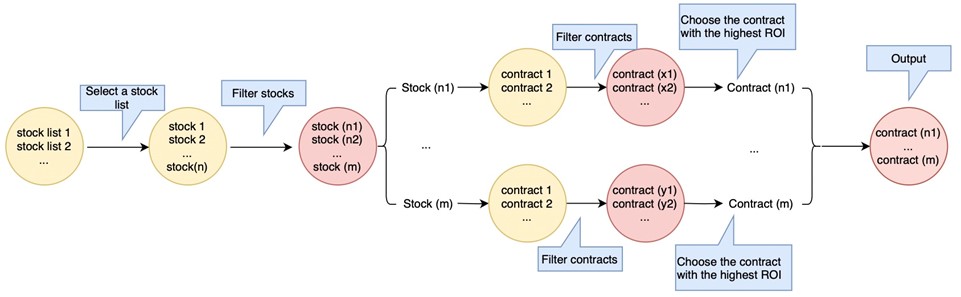
What is the Webull Option Seller Report? Webull’s Option Seller Report is a tool designed to help option sellers sort through thousands of option contracts with different strike prices and expiration dates to get the highest ROI. If you are new to options writing, this tool may help you get started selling options. If you are an experienced option seller, it may enhance the option writing process. How do you use the Option Seller Report? Step 1 - Select a stock list As an option seller, you may want to screen for suitable option contracts to sell out of a larger pool of symbols. This tool supports two specific stock lists for this purpose: Whole Market and S&P 500. "Whole Market" presents you with a list of all symbols you can sell options on from the whole market. "S&P 500" shows option-tradable symbols from among the 500 companies that make up S&P’s famous index. Step 2 - Choose an option strategy Before you select a contract, you must decide what strategy to use. This tool currently supports two basic option selling strategies: Cash-secured Puts and Covered Calls. Step 3 - Set a stock filter After selecting a strategy, you may want to screen for underlying stocks which demonstrate specific patterns. For example, when you choose a Cash-secured Put, you may be more interested in stocks that are neutral or bullish in trend. This tool has the moving average (MA) technical indicator integrated in its search function, allowing you to filter contracts based on this indicator. For example, you can set filters to see the last price above MA5, MA5 crossed above MA10, etc. Step 4 - Set an option filter Once you’ve set the Stock Filter, you’ll have a filtered list of stocks to choose from. But each stock has many option contracts with different strike prices and expiration dates that may need further filtering. For example, you might want to filter out contracts that are too illiquid or too far out-of-the-money, or you might want to select contracts that are nearing expiration. To screen for suitable option contracts, we offer 5 Option Filter parameters: Moneyness, Minimum Open Interest, Days to Expiration, Return on Investment, and Delta. Step 5 - Choose the right options contract Using the Option Filter, all option contracts (Call or Put) under each stock are screened, and the top 100 by largest ROI will be selected from those that fit the screening criteria. However, the contract with the largest ROI is not always the most suitable. To help you make an informed decision, we’ve added more indicators to the final list, for even more precise screening of contracts. |
 |
How do you set a Stock Filter? This tool is integrated with the “Moving Average” technical indicator, and you can set filter conditions based on this indicator. Up to 5 filter conditions can be set. How do you set an Option Filter? To screen for suitable option contracts, we offer 5 Option Filter parameters: Moneyness, Minimum Open Interest, Days to Expiration, ROI, and Delta. Moneyness Moneyness refers to a contract’s intrinsic value, based on how far the contract is in the money —in other words, how profitable or unprofitable it would be for the holder of the option to exercise (not taking into account premiums paid or received). The percentage figure for moneyness can either be positive or negative based on whether the contract is in-the-money or out-of-the-money. See the graphical depiction of the relationship between the percentage of moneyness versus whether the option is either in the money or out of the money. |
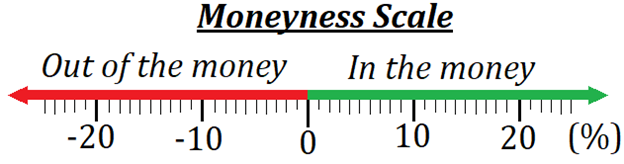 |
To see an example of how moneyness is calculated, let’s imagine an OTM put contract with an underlying stock price of $100 and a strike price of $80. Using the equation (80-100)/100 we calculate a moneyness of -20%. This means that the stock price must fall by 20% before it will become profitable for a put holder to exercise. The further out-of-the-money a contract is, the more the price of the underlying must move before the contract is profitable to exercise. In this way, a contract being further OTM is better for the option seller. However, a lack of moneyness also means the seller receives a smaller premium, as there is less likelihood that the contract will have any value to the buyer. The default range of moneyness is set to -25%-0%, but can be set to a custom range. Minimum Open Interest Open interest tracks how many open positions there are for a particular contract. Higher open interest typically indicates more liquidity. By setting a minimum on open interest, you are able to filter out contracts with lower liquidity. The default minimum open interest is set to 100, but can be set to any amount. Days to Expiration (DTE) The days to expiration (DTE) of an option is the number of days remaining until the option expires. Option sellers often focus on contracts with smaller DTE, because as the expiration date approaches, Time Decay will become significantly larger (except for deep in-the-money/out-of-the-money contracts). The default range of DTE is set to 0-45 days, but this range can be modified. Return on Investment (ROI) Return on Investment (ROI) is a popular profitability metric used to evaluate how well an investment has performed. ROI is expressed as a percentage and is calculated by dividing an investment's net profit (or loss) by its initial cost or outlay. The default range of ROI is set to 0% to 100%. You can modify this amount. Delta Delta is the theoretical estimate of how much an option's value may change given a $1 move in the underlying security. For a short call, the value of Delta is between -1 and 0, and for a short put, the value of Delta is between 0 and 1. Delta can also be used to help assess the likelihood that an option will end in-the-money at expiration. As a general rule, the smaller the absolute value of Delta, the lower the probability that the contract will be assigned.
ROI
ROI if assigned ROI if assigned = [premium + (strike price – stock price)]/ (stock price- premium)) This indicator is only available for Covered Calls, and it represents the maximum rate of return for investors who receive an assignment on their covered call position. This return calculation includes the premium collected from the sale of the call, and the potential gain from stock price rise. For OTM Covered Calls, ROI and ROI if assigned are in a trade-off relationship. ROI gets smaller the further away the strike price is from the stock price, while the ROI-if-assigned gets larger. Note: ROI Calculations for covered calls use the price of the underlying stock at the current time. If you sell a covered call against a pre-existing long stock position, the actual Return on Investment will be based on your cost basis in that position, which may be different from the current stock price.
|
Option trading entails significant risk and is not appropriate for all investors. Option investors can rapidly lose the entire value of their investment in a short period of time and incur permanent loss by expiration date. You need to complete an options trading application and get approval on eligible accounts. Please read the Characteristics and Risks of Standardized Options and Option Spread Risk Disclosure before trading options. |
'%3e %3cpath d='M41.7832962%2c0 C41.9459106%2c0 42.0882746%2c0.0866854658 42.1666825%2c0.216359069 C43.8289923%2c2.66540836 44.7676281%2c5.46271319 44.7676281%2c8.43208061 C44.7676281%2c18.1345746 34.7460532%2c26 22.383814%2c26 C10.0215749%2c26 0%2c18.1345746 0%2c8.43208061 C0%2c5.46716016 0.935826425%2c2.67378733 2.58829888%2c0.223985685 C2.67109477%2c0.0916264068 2.81687473%2c0 2.9840593%2c0 C3.23130408%2c0 3.43173558%2c0.200393004 3.43173558%2c0.447590303 C3.43173558%2c0.475056669 3.42926112%2c0.501945205 3.42452292%2c0.528045226 L3.41810883%2c0.550292077 C3.37800671%2c0.861741908 3.3575721%2c1.17661276 3.3575721%2c1.49443092 C3.3575721%2c7.98336 11.2132389%2c12.5742305 22.383814%2c12.5742305 C33.5543891%2c12.5742305 41.410056%2c7.98336 41.410056%2c1.49443092 C41.410056%2c1.17865223 41.3898828%2c0.865783153 41.3502888%2c0.556288325 C41.3402868%2c0.521941442 41.3356199%2c0.48531078 41.3356199%2c0.447590303 C41.3356199%2c0.200393004 41.5360514%2c0 41.7832962%2c0 Z' id='logo%e5%a4%87%e4%bb%bd-6' fill='%231942E0'%3e%3c/path%3e %3cpath d='M74.6899231%2c3.74404927 C75.2411227%2c3.74404927 75.7734299%2c3.66184338 76.2756219%2c3.50883715 L73.8159676%2c20.8666902 C73.5770593%2c22.5662954 72.8072434%2c23.0518969 71.4268838%2c23.0518969 L69.9934336%2c23.0518969 C68.7988917%2c23.0518969 68.1618027%2c22.458384 67.7901674%2c20.893668 L65.6930827%2c11.9909739 C65.639992%2c11.7481731 65.639992%2c11.6942174 65.5338105%2c11.6942174 C65.427629%2c11.6942174 65.4010836%2c11.7481731 65.3479929%2c11.9909739 L63.2509082%2c20.893668 C62.8792729%2c22.458384 62.2421839%2c23.0518969 61.047642%2c23.0518969 L59.6141918%2c23.0518969 C58.2338322%2c23.0518969 57.4640163%2c22.5662954 57.225108%2c20.8666902 L54.7463723%2c3.37406084 C55.3593498%2c3.61307396 56.0249975%2c3.74404927 56.7207458%2c3.74404927 C57.3314263%2c3.74404927 57.918917%2c3.64314414 58.4679557%2c3.4568446 L60.3574623%2c19.3829078 C60.3840076%2c19.6257086 60.3840076%2c19.7875757 60.4901891%2c19.7875757 C60.5963706%2c19.7875757 60.5963706%2c19.6257086 60.6494614%2c19.3829078 L62.9323637%2c9.91367858 C63.0916359%2c9.26620991 63.4632712%2c8.69967483 64.6047223%2c8.69967483 L66.4363532%2c8.69967483 C67.5778044%2c8.69967483 67.9494397%2c9.26620991 68.1087119%2c9.91367858 L70.3916142%2c19.3829078 C70.4447049%2c19.6257086 70.4447049%2c19.7875757 70.5508864%2c19.7875757 C70.6570679%2c19.7875757 70.6570679%2c19.6257086 70.6836133%2c19.3829078 L72.5891207%2c3.32292288 C73.2365902%2c3.59432921 73.9460524%2c3.74404927 74.6899231%2c3.74404927 Z' id='Combined-Shape' fill='black'%3e%3c/path%3e %3cpath d='M84.5933901%2c7.43171536 C88.6813779%2c7.43171536 90.9111894%2c10.2643908 90.9111894%2c14.2840921 L90.9111894%2c15.7948523 C90.9111894%2c16.2264981 90.7519172%2c16.4692988 90.3802819%2c16.4692988 L81.7264895%2c16.4692988 L81.7264895%2c16.5502324 C81.7264895%2c18.1149484 82.3635785%2c19.9764208 84.9119346%2c19.9764208 C86.849747%2c19.9764208 88.6813779%2c19.8145536 89.7962837%2c19.7066422 L89.8759198%2c19.7066422 C90.1413735%2c19.7066422 90.3537366%2c19.8415315 90.3537366%2c20.1113101 L90.3537366%2c21.8918489 C90.3537366%2c22.3234947 90.2741004%2c22.5123397 89.7962837%2c22.5932733 C88.0708343%2c22.9170076 87.0355646%2c23.0518969 84.6464808%2c23.0518969 C81.9919433%2c23.0518969 78.2225%2c21.5950924 78.2225%2c16.2804538 L78.2225%2c14.2840921 C78.2225%2c10.0755457 80.5319476%2c7.43171536 84.5933901%2c7.43171536 Z M84.5933901%2c10.5071915 C82.9475768%2c10.5071915 81.7530349%2c11.6942174 81.7530349%2c13.8254684 L81.7530349%2c13.9333799 L87.3806545%2c13.9333799 L87.3806545%2c13.8254684 C87.3806545%2c11.7211953 86.2392034%2c10.5071915 84.5933901%2c10.5071915 Z' id='Combined-Shape' fill='black'%3e%3c/path%3e %3cpath d='M97.4154906%2c2.98826245 L97.4148064%2c7.62056039 C98.3969853%2c7.48567108 99.3260735%2c7.43171536 99.9631625%2c7.43171536 C104.236968%2c7.43171536 106.307507%2c9.99461216 106.307507%2c14.2031585 L106.307507%2c16.2804538 C106.307507%2c20.4890001 104.236968%2c23.0518969 99.9631625%2c23.0518969 C98.2642584%2c23.0518969 96.2733553%2c22.7821183 94.627542%2c22.3504725 C94.0169984%2c22.1886054 93.9108169%2c22.0267382 93.9108169%2c21.6220703 L93.9098179%2c3.08694115 C94.4185466%2c3.24434375 94.9584615%2c3.32900525 95.5178331%2c3.32900525 C96.184659%2c3.32900525 96.8238351%2c3.20869291 97.4154906%2c2.98826245 Z M99.9631625%2c10.3453244 C99.3260735%2c10.3453244 98.1580769%2c10.4262579 97.4148064%2c10.5341694 L97.4148064%2c19.9494429 C97.9191686%2c20.0573544 99.007529%2c20.1382879 99.9631625%2c20.1382879 C102.246065%2c20.1382879 102.803518%2c18.4926384 102.803518%2c16.2804538 L102.803518%2c14.2031585 C102.803518%2c11.9909739 102.246065%2c10.3453244 99.9631625%2c10.3453244 Z' id='Combined-Shape' fill='black'%3e%3c/path%3e %3cpath d='M111.036668%2c8.72457747 C111.579488%2c8.72457747 112.103987%2c8.64485191 112.599444%2c8.49629404 L112.598761%2c16.5232546 C112.598761%2c19.3289521 113.607485%2c19.9764208 115.147117%2c19.9764208 L115.306389%2c19.9764208 C116.846021%2c19.9764208 117.854746%2c19.3289521 117.854746%2c16.5232546 L117.854207%2c8.4334735 C118.406525%2c8.62226395 118.997939%2c8.72457747 119.612866%2c8.72457747 C120.223332%2c8.72457747 120.810625%2c8.62374317 121.359498%2c8.43756894 L121.358735%2c16.5232546 C121.358735%2c22.4044283 116.872567%2c23.0518969 115.306389%2c23.0518969 L115.060464%2c23.0512514 C113.42215%2c23.0271041 109.094772%2c22.2994073 109.094772%2c16.5232546 L109.094446%2c8.36700801 C109.698522%2c8.59813531 110.353066%2c8.72457747 111.036668%2c8.72457747 Z' id='Combined-Shape' fill='black'%3e%3c/path%3e %3cpath d='M128.314162%2c3.03790128 L128.313623%2c22.269539 C128.313623%2c22.5662954 128.10126%2c22.836074 127.809261%2c22.836074 L125.340541%2c22.836074 C125.048542%2c22.836074 124.809634%2c22.5662954 124.809634%2c22.269539 L124.809455%2c3.04219481 C125.358161%2c3.22824247 125.945253%2c3.32900525 126.555503%2c3.32900525 C127.17043%2c3.32900525 127.761844%2c3.22669173 128.314162%2c3.03790128 Z' id='Combined-Shape' fill='black'%3e%3c/path%3e %3cpath d='M133.90653%2c3.32900525 C134.473329%2c3.32900525 135.02015%2c3.24208064 135.534793%2c3.08063296 L135.533966%2c22.269539 C135.533966%2c22.5662954 135.321603%2c22.836074 135.029603%2c22.836074 L132.560884%2c22.836074 C132.268884%2c22.836074 132.029976%2c22.5662954 132.029976%2c22.269539 L132.029909%2c2.99605058 C132.615669%2c3.21152525 133.2476%2c3.32900525 133.90653%2c3.32900525 Z' id='Combined-Shape' fill='black'%3e%3c/path%3e %3c/g%3e %3c/g%3e %3c/g%3e%3c/svg%3e)