'%3e %3cpath d='M41.7832962%2c0 C41.9459106%2c0 42.0882746%2c0.0866854658 42.1666825%2c0.216359069 C43.8289923%2c2.66540836 44.7676281%2c5.46271319 44.7676281%2c8.43208061 C44.7676281%2c18.1345746 34.7460532%2c26 22.383814%2c26 C10.0215749%2c26 0%2c18.1345746 0%2c8.43208061 C0%2c5.46716016 0.935826425%2c2.67378733 2.58829888%2c0.223985685 C2.67109477%2c0.0916264068 2.81687473%2c0 2.9840593%2c0 C3.23130408%2c0 3.43173558%2c0.200393004 3.43173558%2c0.447590303 C3.43173558%2c0.475056669 3.42926112%2c0.501945205 3.42452292%2c0.528045226 L3.41810883%2c0.550292077 C3.37800671%2c0.861741908 3.3575721%2c1.17661276 3.3575721%2c1.49443092 C3.3575721%2c7.98336 11.2132389%2c12.5742305 22.383814%2c12.5742305 C33.5543891%2c12.5742305 41.410056%2c7.98336 41.410056%2c1.49443092 C41.410056%2c1.17865223 41.3898828%2c0.865783153 41.3502888%2c0.556288325 C41.3402868%2c0.521941442 41.3356199%2c0.48531078 41.3356199%2c0.447590303 C41.3356199%2c0.200393004 41.5360514%2c0 41.7832962%2c0 Z' id='logo%e5%a4%87%e4%bb%bd-6' fill='white'%3e%3c/path%3e %3cpath d='M74.6899231%2c3.74404927 C75.2411227%2c3.74404927 75.7734299%2c3.66184338 76.2756219%2c3.50883715 L73.8159676%2c20.8666902 C73.5770593%2c22.5662954 72.8072434%2c23.0518969 71.4268838%2c23.0518969 L69.9934336%2c23.0518969 C68.7988917%2c23.0518969 68.1618027%2c22.458384 67.7901674%2c20.893668 L65.6930827%2c11.9909739 C65.639992%2c11.7481731 65.639992%2c11.6942174 65.5338105%2c11.6942174 C65.427629%2c11.6942174 65.4010836%2c11.7481731 65.3479929%2c11.9909739 L63.2509082%2c20.893668 C62.8792729%2c22.458384 62.2421839%2c23.0518969 61.047642%2c23.0518969 L59.6141918%2c23.0518969 C58.2338322%2c23.0518969 57.4640163%2c22.5662954 57.225108%2c20.8666902 L54.7463723%2c3.37406084 C55.3593498%2c3.61307396 56.0249975%2c3.74404927 56.7207458%2c3.74404927 C57.3314263%2c3.74404927 57.918917%2c3.64314414 58.4679557%2c3.4568446 L60.3574623%2c19.3829078 C60.3840076%2c19.6257086 60.3840076%2c19.7875757 60.4901891%2c19.7875757 C60.5963706%2c19.7875757 60.5963706%2c19.6257086 60.6494614%2c19.3829078 L62.9323637%2c9.91367858 C63.0916359%2c9.26620991 63.4632712%2c8.69967483 64.6047223%2c8.69967483 L66.4363532%2c8.69967483 C67.5778044%2c8.69967483 67.9494397%2c9.26620991 68.1087119%2c9.91367858 L70.3916142%2c19.3829078 C70.4447049%2c19.6257086 70.4447049%2c19.7875757 70.5508864%2c19.7875757 C70.6570679%2c19.7875757 70.6570679%2c19.6257086 70.6836133%2c19.3829078 L72.5891207%2c3.32292288 C73.2365902%2c3.59432921 73.9460524%2c3.74404927 74.6899231%2c3.74404927 Z' id='Combined-Shape' fill='white'%3e%3c/path%3e %3cpath d='M84.5933901%2c7.43171536 C88.6813779%2c7.43171536 90.9111894%2c10.2643908 90.9111894%2c14.2840921 L90.9111894%2c15.7948523 C90.9111894%2c16.2264981 90.7519172%2c16.4692988 90.3802819%2c16.4692988 L81.7264895%2c16.4692988 L81.7264895%2c16.5502324 C81.7264895%2c18.1149484 82.3635785%2c19.9764208 84.9119346%2c19.9764208 C86.849747%2c19.9764208 88.6813779%2c19.8145536 89.7962837%2c19.7066422 L89.8759198%2c19.7066422 C90.1413735%2c19.7066422 90.3537366%2c19.8415315 90.3537366%2c20.1113101 L90.3537366%2c21.8918489 C90.3537366%2c22.3234947 90.2741004%2c22.5123397 89.7962837%2c22.5932733 C88.0708343%2c22.9170076 87.0355646%2c23.0518969 84.6464808%2c23.0518969 C81.9919433%2c23.0518969 78.2225%2c21.5950924 78.2225%2c16.2804538 L78.2225%2c14.2840921 C78.2225%2c10.0755457 80.5319476%2c7.43171536 84.5933901%2c7.43171536 Z M84.5933901%2c10.5071915 C82.9475768%2c10.5071915 81.7530349%2c11.6942174 81.7530349%2c13.8254684 L81.7530349%2c13.9333799 L87.3806545%2c13.9333799 L87.3806545%2c13.8254684 C87.3806545%2c11.7211953 86.2392034%2c10.5071915 84.5933901%2c10.5071915 Z' id='Combined-Shape' fill='white'%3e%3c/path%3e %3cpath d='M97.4154906%2c2.98826245 L97.4148064%2c7.62056039 C98.3969853%2c7.48567108 99.3260735%2c7.43171536 99.9631625%2c7.43171536 C104.236968%2c7.43171536 106.307507%2c9.99461216 106.307507%2c14.2031585 L106.307507%2c16.2804538 C106.307507%2c20.4890001 104.236968%2c23.0518969 99.9631625%2c23.0518969 C98.2642584%2c23.0518969 96.2733553%2c22.7821183 94.627542%2c22.3504725 C94.0169984%2c22.1886054 93.9108169%2c22.0267382 93.9108169%2c21.6220703 L93.9098179%2c3.08694115 C94.4185466%2c3.24434375 94.9584615%2c3.32900525 95.5178331%2c3.32900525 C96.184659%2c3.32900525 96.8238351%2c3.20869291 97.4154906%2c2.98826245 Z M99.9631625%2c10.3453244 C99.3260735%2c10.3453244 98.1580769%2c10.4262579 97.4148064%2c10.5341694 L97.4148064%2c19.9494429 C97.9191686%2c20.0573544 99.007529%2c20.1382879 99.9631625%2c20.1382879 C102.246065%2c20.1382879 102.803518%2c18.4926384 102.803518%2c16.2804538 L102.803518%2c14.2031585 C102.803518%2c11.9909739 102.246065%2c10.3453244 99.9631625%2c10.3453244 Z' id='Combined-Shape' fill='white'%3e%3c/path%3e %3cpath d='M111.036668%2c8.72457747 C111.579488%2c8.72457747 112.103987%2c8.64485191 112.599444%2c8.49629404 L112.598761%2c16.5232546 C112.598761%2c19.3289521 113.607485%2c19.9764208 115.147117%2c19.9764208 L115.306389%2c19.9764208 C116.846021%2c19.9764208 117.854746%2c19.3289521 117.854746%2c16.5232546 L117.854207%2c8.4334735 C118.406525%2c8.62226395 118.997939%2c8.72457747 119.612866%2c8.72457747 C120.223332%2c8.72457747 120.810625%2c8.62374317 121.359498%2c8.43756894 L121.358735%2c16.5232546 C121.358735%2c22.4044283 116.872567%2c23.0518969 115.306389%2c23.0518969 L115.060464%2c23.0512514 C113.42215%2c23.0271041 109.094772%2c22.2994073 109.094772%2c16.5232546 L109.094446%2c8.36700801 C109.698522%2c8.59813531 110.353066%2c8.72457747 111.036668%2c8.72457747 Z' id='Combined-Shape' fill='white'%3e%3c/path%3e %3cpath d='M128.314162%2c3.03790128 L128.313623%2c22.269539 C128.313623%2c22.5662954 128.10126%2c22.836074 127.809261%2c22.836074 L125.340541%2c22.836074 C125.048542%2c22.836074 124.809634%2c22.5662954 124.809634%2c22.269539 L124.809455%2c3.04219481 C125.358161%2c3.22824247 125.945253%2c3.32900525 126.555503%2c3.32900525 C127.17043%2c3.32900525 127.761844%2c3.22669173 128.314162%2c3.03790128 Z' id='Combined-Shape' fill='white'%3e%3c/path%3e %3cpath d='M133.90653%2c3.32900525 C134.473329%2c3.32900525 135.02015%2c3.24208064 135.534793%2c3.08063296 L135.533966%2c22.269539 C135.533966%2c22.5662954 135.321603%2c22.836074 135.029603%2c22.836074 L132.560884%2c22.836074 C132.268884%2c22.836074 132.029976%2c22.5662954 132.029976%2c22.269539 L132.029909%2c2.99605058 C132.615669%2c3.21152525 133.2476%2c3.32900525 133.90653%2c3.32900525 Z' id='Combined-Shape' fill='white'%3e%3c/path%3e %3c/g%3e %3c/g%3e %3c/g%3e%3c/svg%3e)



Financial platforms are increasingly usable outside a mobile app or desktop window. Market data and brokerage tools now show up inside developer environments, automated workflows, software applications, and AI assistants.
Webull CLI extends Webull into the command line. If you already work in a terminal, you can pull quotes, run screens, check positions, and place supported orders without switching to another interface — and you can wire any of it into something larger.
Key Takeaways
One interface, five asset classes. Stocks and ETFs, options, futures, crypto, and event contracts — market data and trading in a single command-line tool.
Agent-first by design. Structured output, a quiet mode, machine-readable errors, and explicit exit codes — built to be called by software, not just by people.
Different from MCP. Cloud MCP and Local MCP are built around AI assistants. The CLI works with or without one.
Alpha Preview. Commands, flags, and output formats may continue to change between releases.
Why Webull Built a CLI
Webull's mobile and desktop platforms are built around direct interaction. You open the app, research a stock, check your portfolio, place a trade.
For developers and technical users, those same tasks are often one step inside a bigger process. You might pull market data into an application, feed positions into a recurring portfolio report, or run a screen on a schedule without opening a brokerage platform at all.
The CLI gives you a direct, programmable path to Webull. Run a command by hand, or drop that same command into a script, an application, or a scheduled job. This makes it especially useful for developers, active traders, power users who want to work directly from the terminal, and AI builders wiring Webull into agents and software.
What You Can Do With Webull CLI
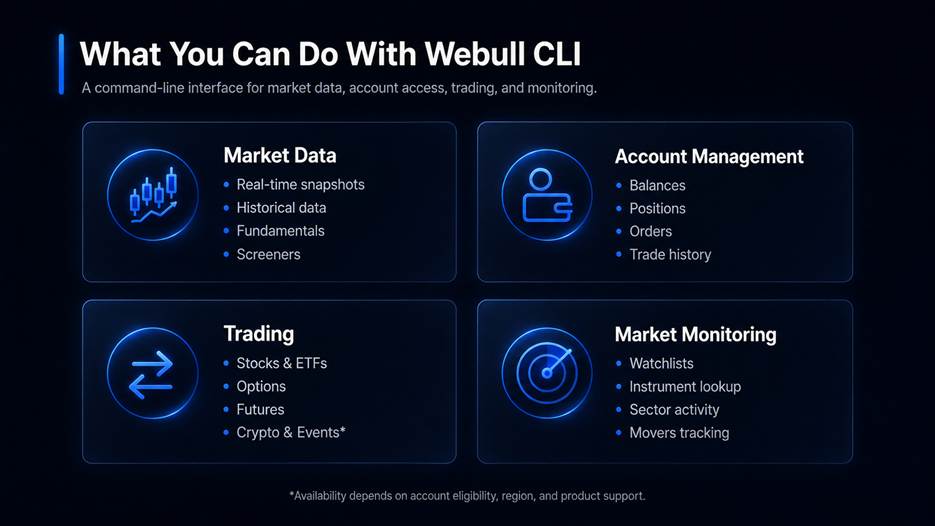
Market data and research. Pull snapshots, historical OHLCV bars, order book depth, and tick-by-tick trade data, with coverage varying by asset class. Research commands reach company profiles, income statements, balance sheets, cash flow statements, analyst ratings and target prices, earnings and dividend calendars, SEC filings, and capital flow. Screeners cover gainers and losers, most actives, sector rankings, high-dividend names, and 52-week highs and lows. Real-time quotes require an active market data subscription.
Account information. Review accounts, balances, and positions, then feed any of it into a dashboard, a report, or a process that pairs your holdings against current market data.
Trading across five asset classes. Submit, preview, replace, and cancel orders in stocks and ETFs, options, futures, event contracts and crypto (no preview/replace), subject to account eligibility, region, and product availability. Multi-leg option strategies and combo orders are supported where available.
Watchlists and market monitoring. Create, update, and reorder watchlists, query supported instruments, and review broader market or sector activity — useful for a quick check or as the data layer under a larger monitoring system.
Capabilities worth calling out
A few areas go deeper than a typical quote-and-trade tool:
Deeper data
Fund and ETF data. Nine commands covering briefs, performance returns, NAV history, top holdings, asset allocation, ratings, dividend history, splits, and regulatory filings.
NOII. NASDAQ opening and closing auction imbalance data — paired shares, imbalance side, and reference, near, and far prices — available as bars and as a real-time snapshot.
Batch bars. OHLCV candlestick history for multiple symbols in a single call.
Footprint. Large-order flow aggregated by time interval, including buy and sell totals, delta, and size breakdown, for stocks and futures.
Financial indicators. Key ratios such as ROA, ROE, and EPS across multiple quarterly or annual periods.
Financial alert. Upcoming earnings release estimates compared against prior-year actuals.
More control over execution
Algo orders. TWAP, VWAP, and POV execution for stock orders, with configurable participation rates and time windows.
Fractional shares. Cash-amount orders (entrust-type=AMOUNT) for dollar-based fractional purchases.
Option contract filtering. Query by underlying, strike range, call or put, American or European style, expiration window, and penny-program eligibility.
Easier setup
doctor. A one-pass diagnostic of your config file, active profile, credentials, and network connectivity.
From Commands to Workflows
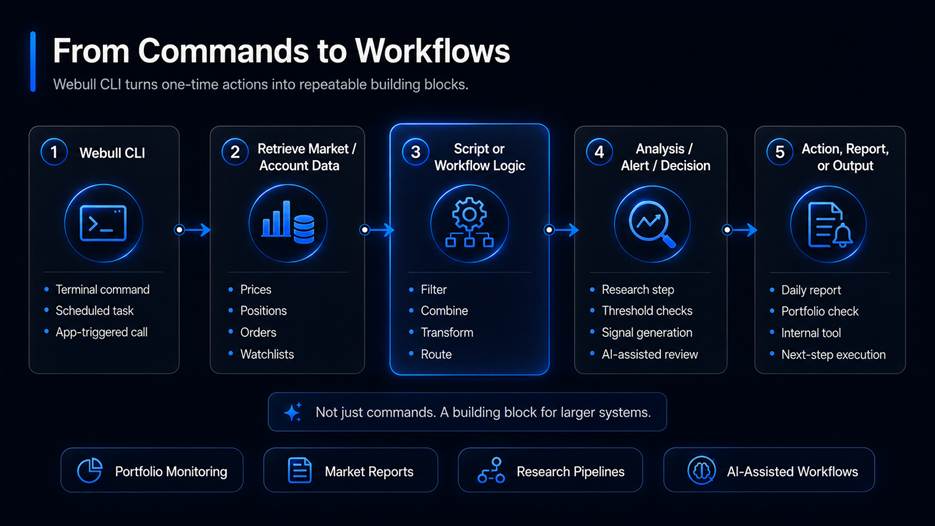
The value of a CLI isn't that a click becomes a keystroke. It's that a command becomes a component.
Output is structured and pipe-friendly, with CSV export available and errors returned in a machine-readable form that scripts can act on. A trader collects market and account data into a recurring portfolio report. A developer feeds Webull data into an analysis pipeline. A scheduled script checks a watchlist every morning and produces exactly the summary you need before the open. For continuous integration and automation, credentials can come from environment variables instead of an interactive login.[WZ6] [IJ7]
The CLI handles the Webull portion. What you build around it is up to you.
Where Webull CLI Fits With Cloud MCP and Local MCP
The CLI joins Webull's growing AI and Model Context Protocol (MCP) ecosystem. The simplest way to tell them apart is to ask who or what is doing the interacting, and how much access you want to grant.
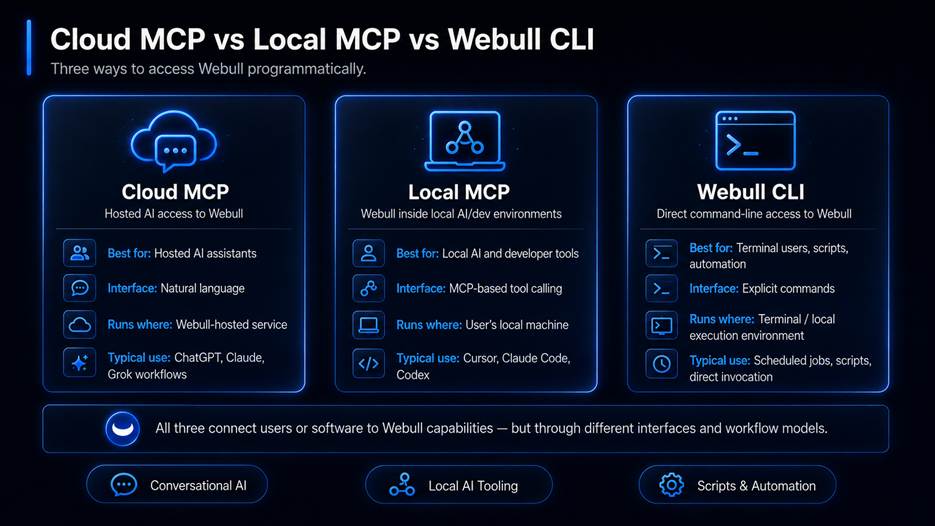
None of these replace the others. If you want an assistant to review an account, Cloud MCP is the shortest path. If you're building an AI coding workflow that needs to act, Local MCP fits. If you already know exactly which operation needs to run — and want it to run repeatedly — the CLI is the more direct building block.
Staying in Control as Trading Becomes More Programmable
Programmable brokerage tools make workflows more efficient. They also make visibility more important.
Order submission, cancellation, and replacement prompt for confirmation when run interactively. A dry-run mode lets you validate parameters without submitting anything, and order preview commands estimate cost before a live order goes out. App Key, App Secret, and two-factor tokens are stored in your operating system's credential store — Keychain on macOS, Credential Manager on Windows, Secret Service on Linux — rather than plaintext configuration files. Webull also recommends running new workflows against the test environment before pointing them at production.
These controls matter most once commands are running inside scripts and automated systems. Automation should reduce repetitive work, not reduce visibility. You remain responsible for reviewing order details, monitoring positions, understanding the behavior of connected tools, and confirming that your workflows operate as intended.
Getting Started
Webull CLI is a single Go binary. Install it with go install, or download a pre-built binary from the GitHub repository. You'll need Webull API credentials first plus a market data subscription if you want real-time quotes. Full setup steps and the complete command reference live in the Webull CLI documentation.
The project is currently in Alpha Preview, so commands, flags, capabilities, and output formats may continue to evolve.
Webull CLI gives developers, traders, and technical users direct terminal access to market data, account information, and trading across five asset classes. It's built for the workflows that already live outside a brokerage app. If that's where your work already happens, the CLI is another way to bring Webull to it.
Disclaimer:
The Webull OpenAPI and MCP Server are provided "as is" without warranty of any kind and do not constitute investment advice. All trading involves a substantial risk of loss. By utilizing these tools, you acknowledge that Al-driven agents may misinterpret instructions, act on delayed data, or perform poorly under certain market conditions. Webull assumes no liability for losses resulting from automated or Al-directed decisions. You are solely responsible for verifying all order details prior to execution, actively monitoring your positions, and ensuring that any connected agents, algorithms, or tools operate exactly as intended.
Webull Financial LLC, Member SIPC, FINRA. Investing involves risk. More info at webull.com/disclosures
